Harold 2.0 Harold now follows the links in what you know, turns your notes into tasks, flags projects going quiet, and runs on any AI subscription.Notes into tasks. Any AI subscription. See what's new →
Free and open · Any AI tool, any model

Harold.

Your source of truth.chief of staff.
One mind for everything you're running.
Harold knows your whole working life, and makes sure nothing slips.

For anyone with more going on than one head can hold.

Several projects, a long list of people, commitments in every direction. Harold holds all of it in one place, so none of it depends on you remembering.

// What Harold does
🧠
Knows everything you know, and follows the connections between it. People, companies, projects, meetings and decisions are linked, so asking about one brings back the rest of the story, and points out what has gone stale.
📡
Keeps your relationships, tasks and deadlines current, and tells you what's slipping. Your brief flags overdue tasks, deadlines and the people you've gone quiet on, before you have to ask.
☀️
Briefs you each workday morning on what matters today. What changed, what's urgent and your top priorities, with a first draft that can be ready before you sit down.
🎯
Learns from every correction. Tell Harold it got something wrong and the lesson is saved. Later sessions start with it, so the same mistake doesn't come back.
⚡
Works in the AI tools you already pay for, with any model. Switch tools or models whenever you like and nothing is lost: what Harold knows stays yours, in your own private repository. Reach it from any chat app or your phone too, through a connector you deploy once.
// No extra AI bill necessary

Harold runs entirely on the AI subscription you already have: Claude, ChatGPT, Cursor, GitHub Copilot, Gemini, Grok, Kimi, Qwen and more. No subscription? Add an API key instead.

A rhythm that keeps everything moving.

A brief in the morning, focused work through the day, and everything captured before you stop. The same rhythm every day is what keeps a busy week from slipping.

☀️
Morning

Daily Brief

On weekdays the first draft can be written in the cloud early in the morning, with your laptop shut. Say good morning and it's on screen: what changed, what's urgent, your top priorities, then ready-to-run prompts for the day's work.

  • Alerts + blockers review
  • Stale relationship flags
  • Calendar + deadline scan
  • Prioritized action prompts
⚡
Active

Session Work

Each priority becomes a focused session: research, writing, analysis, deal review. Everything Harold knows about the people and projects involved comes with it.

  • Research grounded in what you know
  • Drafts on demand
  • Conversations logged as they happen
  • Second opinions from other models
🌙
Close

Session Capture

Before a turn ends, Harold checks that what you learned is written down and your contacts are up to date, then saves everything. If something is missing, it goes back and finishes. Say you're done and it wraps up the whole session. Weekly and monthly upkeep can run on its own and only tells you what needs you.

  • Key decisions logged
  • Interactions recorded
  • Follow-ups queued
  • Knowledge base updated

Everything you run, in one place.

Each part does one job for you, and they all share what they know, so a follow-up you agree to in a meeting turns up in your brief when it's due.

🗄️

Knowledge Vault

Everything you know, kept for good: people, companies, projects, meetings, decisions and intel, linked to each other and searchable, with every change saved. Ask about anyone or anything and Harold follows the links to the full story.

permanent memory
🤝

Relationship CRM

Every relationship across your whole working life, not one employer's. See how warm each one is and who you're overdue to talk to, with one pipeline where every entry says why it's there.

your whole working life
🚨

Alerts

Alerts flag overdue tasks and missed deadlines, blockers that have sat too long and events coming up without prep. Your brief adds the relationships and the projects you've let go quiet, with each project's next step. Most urgent first, so you know where to start.

before you ask
📋

Task Management

Paste your call notes or forward an email, and every commitment in it becomes a task without you asking: yours, and what others owe you. Keep the task manager you already use: Linear works out of the box, and others connect through your AI tool.

any task manager · linear by default
📖

Playbooks

Your recurring work, done the same good way every time: the morning brief, meeting debriefs, new contacts, event prep. No commands to remember: say what you're doing and the right one runs.

fired by what you say
🔬

Model Council

A second and third opinion on big decisions. Put one hard question to several AI models at once and see where they agree, where they differ, and a combined answer. Optional, and installed separately.

optional add-on
🔒

Boot & Close

Every session starts knowing everything and ends with the work saved. Before you say a word, your rules, lessons and priorities are loaded, and Harold won't start if something it needs can't be read. At the end of every turn it checks that the day's work is written down, your contacts are up to date and every action item has its task, sends the AI back to finish if not, and saves everything. Where your AI tool can run it automatically, none of this depends on the AI remembering.

every session

Agents act.
Harold is the office they work in.

Whichever AI agent you use, and however good it gets, it does better work with an office around it: your knowledge, relationships and routines, already organized, with rules it can't skip. That's Harold.

🏢
Already built

Ready on day one

A CRM, a pipeline where every entry has a stated purpose, notes on people, companies, meetings and decisions, and playbooks for the morning brief, debriefs and follow-up. Ready for your agent to move in.

🔒
Nothing falls through

Starts informed. Ends filed.

Your context is loaded before the first word, and people, decisions and lessons are filed before a session ends. In AI tools that support it, a separate check makes sure it happens every time, not only when the AI remembers.

🔑
Yours, in any tool

Agents come and go. The office stays.

Your knowledge and contacts stay yours, in your own private repository and your own database. Change AI tools or models and nothing is lost.

Expedition HQ.

See what every session is working on, live. When several things are moving at once, one screen shows which sessions are researching, writing, coding or reaching out, and what each one is doing. It's optional and runs where your sessions run: your computer or your server.
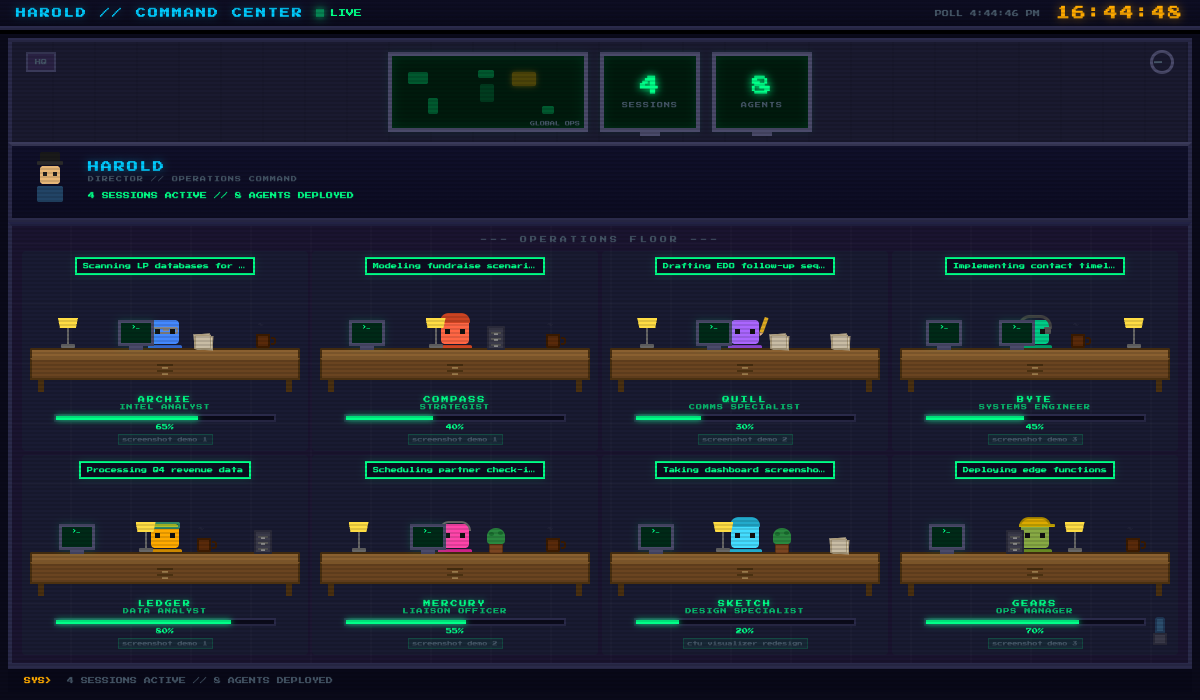
Expedition HQ command center with eight agent desks for research, strategy, writing, coding, data, comms, design, and ops, three of them active
// EXPEDITION HQ: 2 sessions, 3 agents active

Every session lights up.

Each session reports what it's doing across eight kinds of work, and Expedition HQ gathers them into one live view: who's researching, who's coding, who's drafting outreach. The demo on this site runs on invented sessions and adds a few extras for fun; the plain live view comes with the starter.

⚡
Nothing to set up. Every session appears on its own when it starts and reports what it's doing as it works.
📡
Any AI tool. Sessions from any tool can show up here. It isn't tied to one.
📋
The whole workload. When several sessions do the same kind of work, you see every task, not just the first.
🔍
Archie
Research
🧭
Compass
Strategy
✍️
Quill
Writing
💻
Byte
Coding
📊
Ledger
Data
📨
Mercury
Comms
🎨
Sketch
Design
⚙️
Gears
Ops

Four layers.
One coherent system.

Harold's power comes from how the layers talk to each other, not from any single tool.

L1 tasks Work Management Active projects, tasks, due dates, blockers, and milestones, in your task manager
Any task managerLinear by default
L2 contacts Relationship CRM Relationships, interactions, cadence, warmth, one purpose-driven pipeline
Supabase by defaultMCP
L3 operations Harold State Files Alerts, blockers, events, facts, project map, lessons learned: real-time operational state
MarkdownJSON
L4 memory Knowledge Vault Deep context: people, companies, projects, decisions, meetings, strategic intel
MarkdownSearch index
L0 floor Boot & Close One private git repository, and a program that loads the rules and enforces them every session
Gitbin/harold

Everything else is in the docs.

Setup, each part in detail, the daily rhythm and how to connect your AI tool.

Plant the seed.
Let it grow.

Harold gets more useful the more you use it: every person, decision and correction makes the next day's work better. Harold built its own CRM and this very page. Free, open and yours.

Want to talk through your setup?

Harold is open and free, but if you want guidance from the creator, book a 30-minute consultation. Ask questions, explore how it fits your workflow, and if it makes sense, we can even help implement.

$100
30 minutes
Book a Consultation →