Harold's relationship layer

Relationship
Intelligence.

A full-featured CRM built for operators who run on relationships, and owned by you for your whole working life. Warmth tracking, cadence alerts, one pipeline where every entry has a purpose, native AI tools, and Harold working across it and your knowledge vault from your AI tool.

🔗
Relationship Tracking
🌡️
Warmth Scoring
📋
Full Audit Trail
🤖
AI-Powered

Beautiful by default.

The real app, running on invented demo data. You start with a clean system and populate it with your own contacts and history over time.

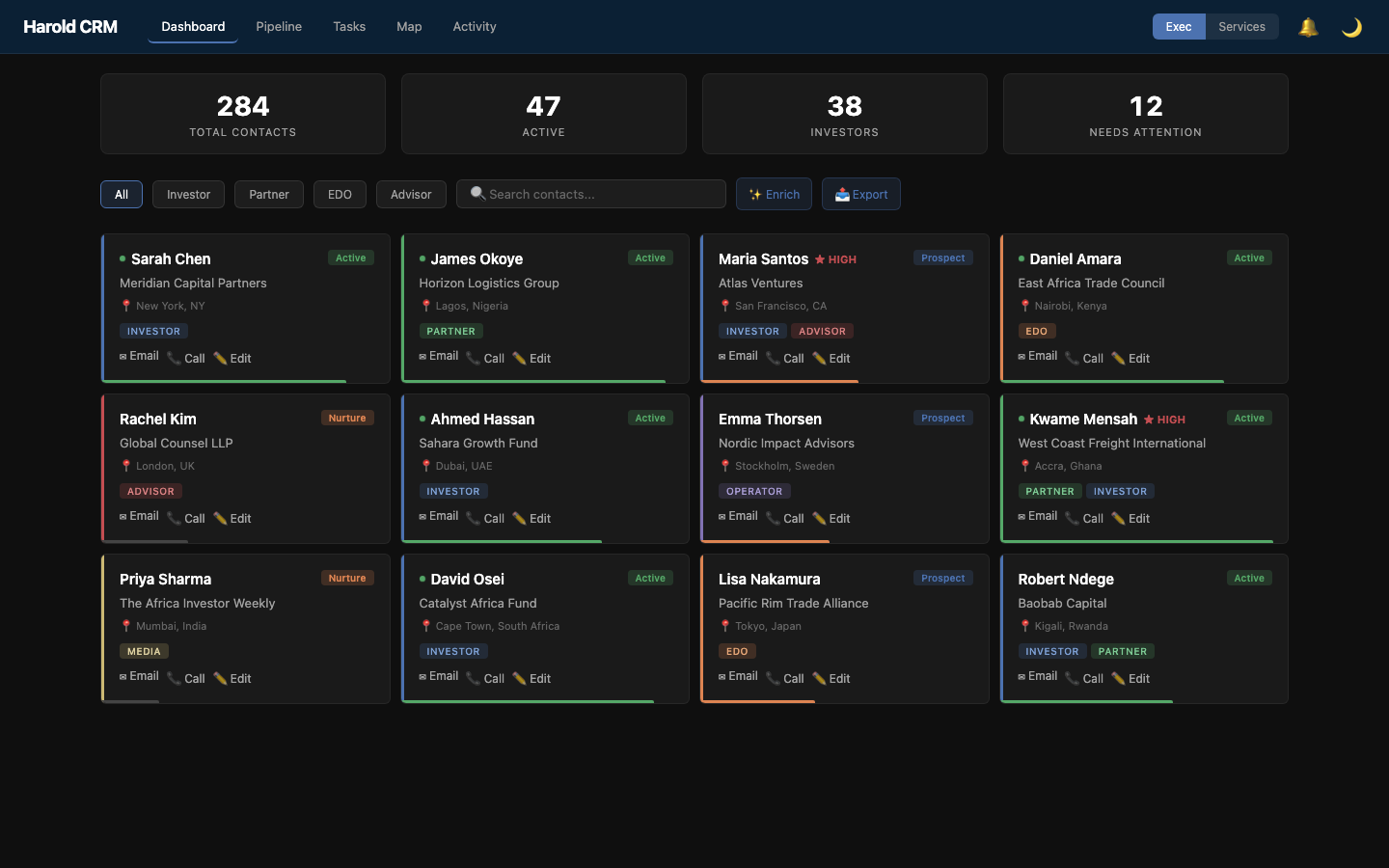
Harold CRM dashboard with a contact grid, type filters, labels and a pipeline card, on demo data
Dashboard: contact grid with type filters and labels, and the pipeline card, with one page per purpose you set (the demo's purposes are examples)
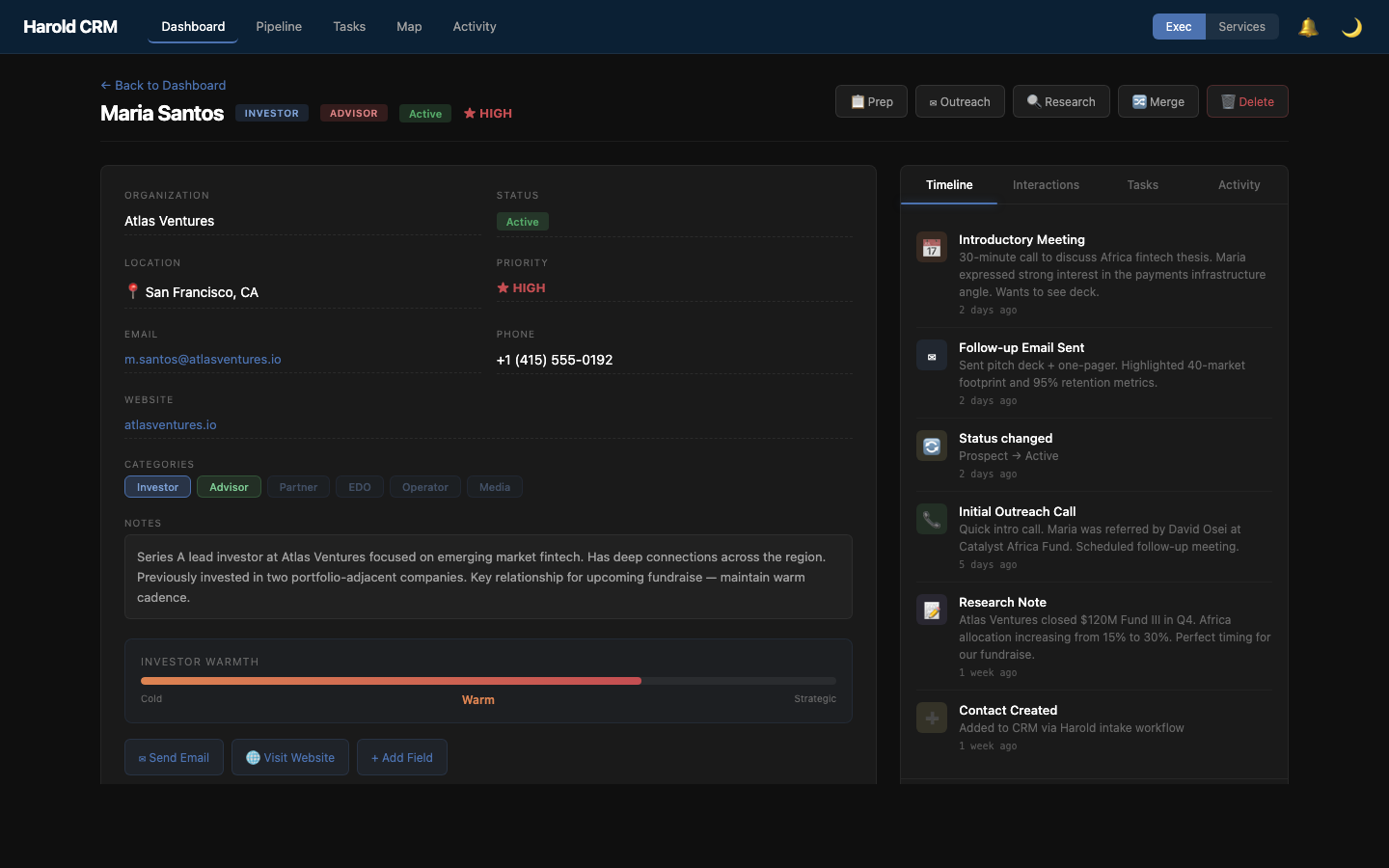
Harold CRM contact detail with type, labels, warmth, editable fields and a relationship timeline, on demo data
Contact detail: one type, any labels, warmth, timeline, and editable fields

One type each. Labels for the rest.

Every contact has exactly one type: what that person is to you. Anything else worth knowing at a glance (a board seat, an advisor, the press) is a label, and a contact can carry as many as you like. You choose both lists. The web app starts with these five; replace them with your own.

Investor
VCs, angels, family offices, LPs
Partner
People and organizations you work with: collaborators, distributors, suppliers, service providers, agencies
Founder
People building companies: peers, portfolio, prospects
Team
Your own colleagues, kept current like everyone else
Other
Everyone who matters but fits none of the above

And there is one pipeline, not one per type. Every entry in it says why the person is there: "Finding a distribution partner", "Hiring a head of sales". The same person can hold two entries for two different reasons, each with its own stage and follow-up cadence. Nothing is placed in the pipeline automatically; an entry exists because a conversation established it.

Relationships decay.
Harold notices.

Warmth is your judgment of how close a relationship is, whatever kind of person it's with. It's never tied to a type. Go too long without an interaction and Harold flags it in your brief; go longer and the web app steps the warmth itself down.

// Warmth Decay Model
🧊
Cold
No real relationship yet
🌤
Lukewarm
Some contact
☀️
Warm
Established
🔥
Hot
Actively engaged
The step-down happens in the web app while it's open, on its own thresholds: a warning after 14 days for Hot, 21 for Warm and 30 for Lukewarm, then Hot drops to Warm at 30 days, Warm to Lukewarm at 45 and Lukewarm to Cold at 60. You can change them in the app's Settings.

Built for how operators actually work.

Audit trails, merge detection, bulk operations, and keyboard-first navigation.

📝

Full Audit Trail

Every interaction, note, email, and status change is logged with timestamps. See the complete history of any relationship at a glance. Nothing falls through the cracks.

complete history
🔀

Contact Merge

Duplicate detection and intelligent merging. When you meet someone twice through different channels, merge their records. Interactions, notes, and labels all combined cleanly.

smart dedup
⌘

Command Palette

Full keyboard-driven navigation. Search contacts, run actions, switch views, and trigger bulk operations. All without touching the mouse. Built for speed.

cmd+k
📦

Bulk Operations

Select multiple contacts to update status or warmth, draft outreach, merge, or delete in one go. Import from CSV, export anytime.

csv import/export
🏷️

Custom Fields

Add any field you need to any contact: deal size, investment thesis, LinkedIn URL, anything else. No changes to the database needed.

your fields
⚡

Realtime Collaboration

Built on Supabase Realtime. Changes sync instantly across sessions. When Harold logs an interaction from your AI tool, the web UI updates live. No refresh needed.

supabase realtime

Intelligence built into the interface.

Help is built directly into the CRM, no Harold session required. Contact research and meeting prep call an AI model with web search from inside the app (Google's Gemini, optional, with your own free API key from Google AI Studio), working from the CRM record and the web. Outreach drafts start from a template for each type of contact. Ask Harold itself, in your AI tool, to research someone or prep a meeting, and it also draws on your knowledge vault: meeting notes, decisions, intel.

🔍

Contact Research

One-click enrichment pulls web data, news, and background into any contact profile, alongside what the CRM already holds. For vault context too, ask Harold in your AI tool.

Built-in research panel on every contact
✉️

Outreach Drafting

A starting draft for each type of contact, filled in with the contact's details. Anything it doesn't know is left as a visible blank, so nothing confidently wrong goes out. Available right from the contact detail page.

Investor • Partner • Everyone else
📋

Meeting Prep

Generate a structured brief for any upcoming meeting: attendee backgrounds, relationship history, open tasks, and talking points. Built into the CRM.

Full meeting brief from the contact page

Open tools.
Yours to run.

What this gives you: your data in your own Supabase database, an app you can run on your computer or deploy wherever you like, and an open standard (MCP) that lets your AI tools reach your contacts.

frontend React + Next.js 62 components, command palette, real-time UI
Next.js 15React 18Tailwind
database Supabase PostgreSQL with Row Level Security, Realtime subscriptions, Auth
PostgreSQLRLSRealtime
ai bridge MCP Servers Harold's hosted connector, which any AI tool that supports remote MCP servers should be able to sign in to, on any device: find contacts, log interactions, update contacts, run the pipeline, see who has gone quiet. A workspace session on a computer that holds the CRM's credentials can use Harold's local server instead
NodeMCP
schema 20 Tables Contacts, labels, pipeline entries and stages, interactions, tasks, organizations, custom fields, audit log, bug reports
7 migrationsRLS
-- Core tables (simplified)

contacts (
  id uuid, name text, org text,
  category text, -- the one type
  warmth text, last_contacted_at timestamptz
)

contact_categories (
  contact_id uuid, category_name text -- labels, never a copy of the type
)

contact_pipelines (
  contact_id uuid, purpose text, project text,
  stage text, entered_at timestamptz, closed_at timestamptz
)

interactions (
  contact_id uuid, type text, subject text, occurred_at timestamptz
)
The CRM is just one layer.

Harold connects your CRM to a knowledge vault, task management, alerts and daily playbooks, with an optional multi-model AI council. The CRM doesn't work in isolation. It works because the whole system works together.